Published On: October 27, 2026

Australian businesses can secure and manage Microsoft 365 as they grow by enforcing multi-factor authentication (MFA), controlling user access, managing devices, monitoring security alerts and establishing clear governance policies. These measures help protect company data, reduce unauthorised access and keep administration consistent as teams, devices and workloads increase. Understanding how to secure Microsoft 365 for business starts with treating identity, devices, applications and information as connected parts of the same security framework.
For growing organisations, security settings must keep pace with employee changes, new devices, external collaboration and expanding data access. CloudPoints Consulting Group Pty Ltd recognises the value of establishing clear Microsoft 365 management practices that support business operations while protecting sensitive information. A structured approach helps IT teams maintain control without creating unnecessary barriers for employees.
Microsoft 365 brings together services such as Exchange Online, SharePoint, OneDrive, Teams and Microsoft Entra ID. Each service supports different business activities, but each also introduces access permissions, configuration decisions and data protection requirements.
As an organisation expands, common problems include:
Knowing how Australian businesses should manage Microsoft 365 means addressing these issues through repeatable policies, defined responsibilities and regular reviews rather than relying on manual fixes after an incident.
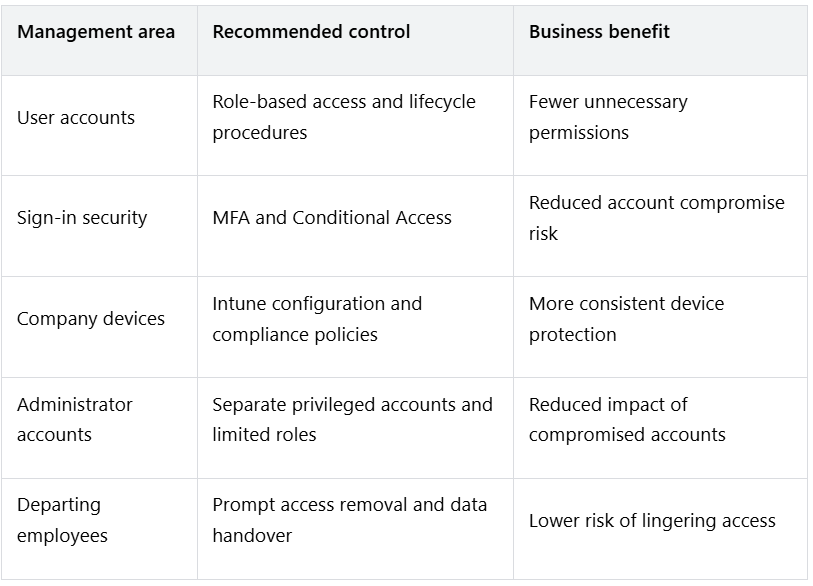
User identities are a primary security boundary for Microsoft 365. Microsoft Entra ID manages authentication and access to Microsoft cloud services, allowing administrators to control how users sign in and which resources they can access.
Multi-factor authentication adds another verification step beyond a password. This helps reduce the risk of unauthorised access when passwords are stolen or reused.
Businesses should:
Conditional Access can apply different requirements based on user risk, device compliance, location and application. Policies should be tested carefully to avoid blocking legitimate business activity or creating gaps through broad exclusions.
MFA is not a complete security strategy on its own. Strong identity protection also requires secure account recovery, restricted administrator privileges and regular reviews of authentication methods.
As headcount increases, administrators need a reliable process for onboarding employees, changing permissions and removing access. Manual account management often leads to inconsistent settings and forgotten permissions.
A documented identity lifecycle should cover three stages:
Microsoft Intune helps manage enrolled computers and mobile devices. Administrators can configure security policies, enforce supported device requirements, deploy applications and assess compliance.
Businesses should define how company-owned and personally owned devices are handled. For personal devices, use supported management options that respect employee privacy while protecting company information. Confirm the relevant Microsoft 365 licence and device-management requirements before deployment.
The most effective security foundation combines identity protection, endpoint security, email safeguards and information controls. Microsoft 365 security features vary by subscription, so administrators should verify which capabilities are available before designing policies.
Core controls include:
A security control is useful only if someone monitors its effectiveness. Assign responsibility for reviewing alerts, investigating incidents and documenting corrective action. Organisations should also establish an escalation process for incidents that require immediate containment.
Microsoft 365 governance defines who can use company resources, how information is stored and shared, who approves changes, and how security responsibilities are maintained.
A practical governance framework should include:
Access governance: Define standard permissions for departments and job roles. Review access to sensitive SharePoint sites, Teams and shared mailboxes regularly.
Licence governance: Assign subscriptions according to business requirements. Review unused licences, overlapping capabilities and feature dependencies before changing plans.
Data governance: Set rules for document ownership, retention, external sharing, classification and deletion. Align these rules with contractual obligations and applicable Australian privacy requirements.
Change management: Record significant configuration changes, approvals and rollback procedures. Test high-impact changes before applying them across the organisation.
Administrative governance: Limit the number of global administrators, use separate privileged accounts and grant additional roles only when needed. Review emergency access accounts and their security arrangements.
Policy ownership: Assign a responsible person to each major policy, such as access control, device compliance, email security and information retention.
Australian organisations can also align their security practices with recognised cybersecurity guidance.
An Essential Eight compliance and maturity assessment using Microsoft 365 can help identify control gaps, establish an implementation roadmap and improve security practices involving application control, patching, access management and device hardening.
Microsoft 365 governance should be documented in language employees can understand. Short, practical rules supported by technical enforcement are generally easier to follow than policies that exist only as lengthy documents.
A business account should not automatically grant unrestricted access from every device. Microsoft Intune can help organisations establish consistent configuration and compliance requirements for supported endpoints.
A device management policy may require:
Conditional Access can work with Intune compliance information to restrict access when a device fails required checks, subject to supported licensing and configuration.
Businesses should also establish patch management responsibilities. Define who approves updates, how urgent vulnerabilities are handled, and how failed installations are resolved. Monitor exceptions instead of allowing non-compliant devices to remain unrestricted indefinitely.
Device compliance should support business needs rather than create unnecessary disruption. Pilot policies with a small group, document exceptions and expand deployment after confirming that essential applications continue to work.
Growth often increases the volume of information shared across departments, contractors, suppliers and customers. Microsoft 365 administrators need clear rules for handling sensitive information across Teams, SharePoint, OneDrive and email.
Useful safeguards include:
Backups also deserve separate attention. Retention, recycle bins and version history can help recover some deleted or changed information, but they do not replace a tested backup and recovery plan. Assess business continuity requirements, recovery time objectives and recovery point objectives before selecting a backup arrangement.
Backups also deserve separate attention. Retention, recycle bins and version history can help recover some deleted or changed information, but they do not replace a tested backup and recovery plan. Businesses should assess their recovery requirements and consider a dedicated Microsoft 365 backup solution with Veeam to protect Exchange Online, SharePoint, OneDrive and Teams data against accidental deletion, ransomware and other data loss incidents.
For Australian organisations, privacy and recordkeeping obligations depend on the nature of the business and the information it handles. The Privacy Act 1988 and Australian Privacy Principles may apply to covered organisations. Businesses should obtain appropriate advice on their specific obligations and avoid assuming that a Microsoft 365 configuration automatically establishes compliance.
Microsoft 365 administration should operate as a regular business process, not an occasional clean-up exercise. Monitoring helps IT teams identify weak configurations, unusual account activity and access that no longer matches business requirements.
A practical review schedule can include:
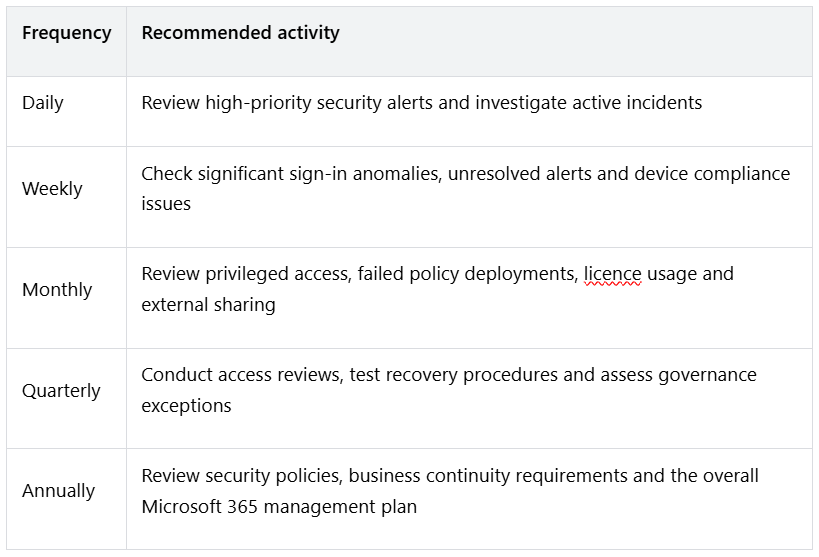
The schedule should reflect organisational risk, staffing and regulatory obligations. High-risk environments may need more frequent checks.
Track useful measures such as MFA coverage, the number of privileged accounts, unresolved high-severity alerts, device compliance rates and the time taken to remove departing employees’ access. These indicators give management a clearer view of security performance and help prioritise improvements.
For organisations that need specialist support, Microsoft 365 consulting Australia services can help assess the current environment, identify configuration gaps and establish administration procedures that fit business requirements. CloudPoints Consulting Group Pty Ltd can be considered when evaluating the support needed to maintain Microsoft cloud services, security settings and operational consistency.
Businesses do not need to change every setting at once. A phased implementation helps reduce disruption while addressing the most serious risks first.
This sequence gives IT teams a clear starting point while allowing controls to be adjusted to the organisation’s size, subscription and operational needs.
How to secure Microsoft 365 for business?
Start by enforcing MFA, limiting administrator privileges, configuring Conditional Access, protecting devices and reviewing external sharing. Add email and endpoint protection, audit logging, tested recovery procedures and regular access reviews. Confirm that the required features are included in your subscription.
How should Australian businesses manage Microsoft 365?
Australian businesses should establish documented procedures for user access, device management, licensing, data protection, security monitoring and employee departures. They should also assess applicable privacy, contractual and recordkeeping obligations and review their Microsoft 365 configuration regularly.
What Microsoft 365 security controls should businesses use?
Core controls include MFA, Conditional Access, least-privilege access, Microsoft Intune device policies, appropriate Microsoft Defender protections, email filtering, audit logging and controlled external sharing. Data loss prevention and sensitivity labels can provide additional safeguards when supported by the subscription and business requirements.
How to manage Microsoft 365 users and devices?
Use a defined onboarding, role-change and offboarding process for user accounts. Assign permissions through appropriate groups, manage supported devices through Intune, apply compliance policies and use Conditional Access to restrict access when required conditions are not met.
Is Microsoft 365 secure for Australian businesses?
Microsoft 365 provides security capabilities that can help protect business information, but the level of protection depends on licensing, configuration, monitoring and administration. Businesses remain responsible for managing access, setting suitable policies and meeting their applicable legal obligations.
Does Microsoft 365 include everything a business needs for security?
No. Available protections depend on the subscription and additional services purchased. Some advanced identity, endpoint, email and information protection capabilities require higher-tier licences or separate products. Review the current Microsoft licensing documentation before deciding which controls to deploy.
A well-managed Microsoft 365 environment gives growing Australian businesses a clearer way to control access, protect information and maintain consistent security as teams and technology change. The strongest foundation combines identity protection, device compliance, sensible permissions, data governance and regular monitoring, supported by clear ownership and tested recovery procedures.
Businesses should review their existing configuration before purchasing additional tools, then prioritise improvements according to risk and operational needs. If your organisation needs help assessing its Microsoft 365 environment or establishing stronger administration practices, reach out to us to discuss suitable next steps. Consistent reviews and accountable administration help keep security aligned with business growth.
Australia
P: +61 3 9087 8057 E: [email protected]Singapore
P: +65 6990 7890 E: [email protected]